Create professional-quality images in seconds — no design skills or expensive software required. Simply describe what you want, and watch your vision come to life with cutting-edge AI technology.
🎨 Text-to-image magic — Just type your idea and generate
⚡ Lightning fast — Professional results in under 30 seconds
🎯 Multiple styles — Photorealistic, artistic, cartoon, and more
📐 Custom dimensions — Perfect for social media, websites, or print
💾 High resolution — Download crisp, print-ready images
🔄 Unlimited iterations — Refine until it's exactly right
Whether you're creating marketing materials, social content, or bringing creative projects to life, our AI image generator delivers professional results without the professional price tag.
Our Privacy Policy has been updated to provide clearer information about our data practices. In parallel, we have updated our Terms of Use to reflect product additions and other adjustments. Please review the current versions:
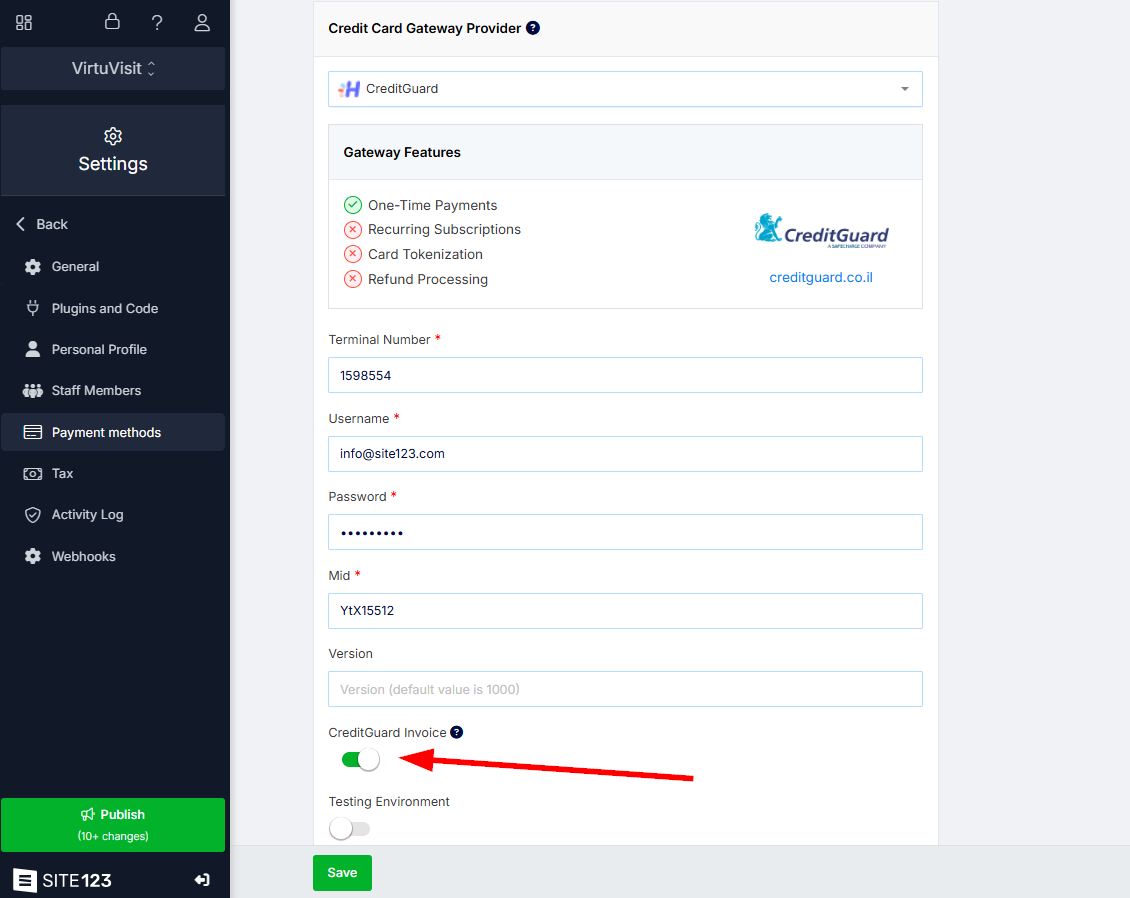
You can now create invoices automatically using the CreditGuard payment gateway, right from your website editor. Once you enable the “CreditGuard Invoice” option, every successful transaction will trigger an invoice to be created and sent to the customer — no need to do it manually.
This saves you time, reduces errors from manual entry, and keeps all your billing in one place. With CreditGuard fully connected to your system, your invoices stay up-to-date, your accounting runs smoother, and your business looks more professional to every client.
With our new POS tool, you can sell and bill without needing an online store!
Create and manage products directly from your interface — for one-time services, subscriptions, or general use. Just pick a product and charge the customer on the spot.
🏪 No store needed
🛍️ Custom and general product options
📅 Monthly, yearly, or flexible billing cycles
⚙️ Quick Payment on/off controls
The POS system makes it easy to collect payments, manage services, and save time — all from one place.
Creating beautiful email templates is now super easy with our new design editor for your Mailing List.
✍️ Add blocks like text, images, buttons, logo, and dividers
🎨 Set custom colors or choose from ready-made color schemes
🖌️ Style every part — background, main color, content, and more
Now you can send professional emails that match your brand, grab attention, and help you build better connections with your subscribers. Great design = more opens and more engagement!
You can now upload your own custom thumbnail for each video on your site! This feature lets you display a preview image that fits your content, makes your video pages look more professional, and helps attract more clicks with eye-catching visuals. It also keeps your branding consistent across all your videos, giving you full control over how they appear and helping them stand out to your visitors.
You can now showcase your work with two new carousel layouts that bring your portfolio to life with smooth, interactive displays. These dynamic layouts make it easier for visitors to browse your projects, give your portfolio a modern and professional look, and help keep people engaged for longer. A more attractive and interactive portfolio means more attention on your work — and a better chance to turn visitors into clients!
Your donation page just got a major upgrade with powerful tools to boost your fundraising efforts:
💰 Let donors enter custom donation amounts
📝 Add personalized messages to your page
📊 Track donor details, including income sources
🎯 Set goal dates to create urgency and motivate giving
These features give donors more flexibility, build trust through transparency, and help you run stronger, more successful campaigns!
You can now choose from two additional header layouts for your Homepage, Promo, and About pages, giving you even more ways to customize your site's appearance. These new layout options help you create a unique first impression that perfectly matches your brand style, keeps visitors engaged with fresh visual designs, and ensures your most important pages stand out with professional, eye-catching headers!
You can now choose from three brand-new layouts for your FAQ page, giving you more design options to perfectly match your website's style. This new feature helps you present your frequently asked questions in a more visually appealing and organized way that fits your brand. Having multiple FAQ layouts improves user experience by making answers easier to find, keeps visitors engaged longer on your site, and ensures your help section looks as professional and polished as the rest of your website!